
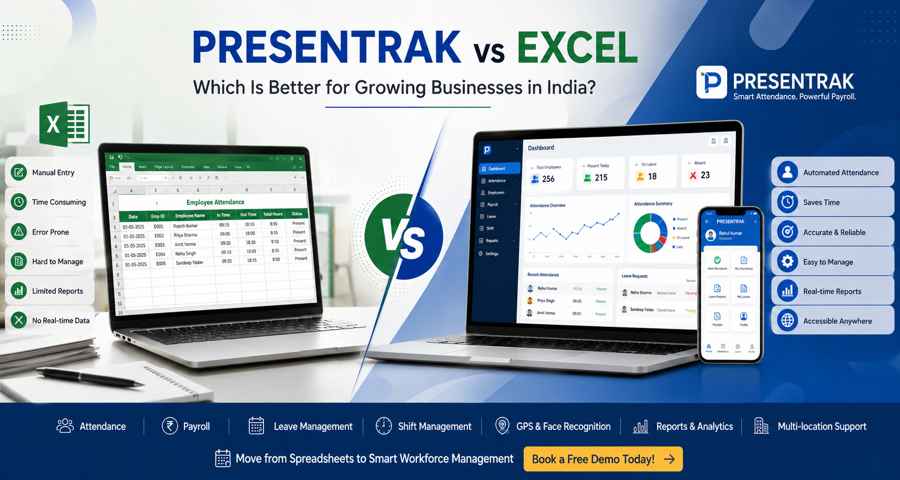
Presentrak vs Excel: Which Is Better for Growing Businesses in India?
Presentrak vs Excel: Which Is Better for Growing Businesses in India?
In Short
Many businesses start managing employee attendance and payroll using Microsoft Excel because it is familiar, inexpensive, and easy to set up. However, as teams grow, manual spreadsheets often become difficult to maintain, leading to attendance errors, payroll mistakes, duplicate records, and increased administrative work.
This comparison explains the key differences between Excel and a dedicated attendance and payroll software solution like Presentrak, helping business owners understand which option best suits their workforce size, operational requirements, and future growth plans.
Key Takeaways
- Excel works well for very small businesses with simple attendance requirements.
- Manual attendance and payroll become increasingly difficult as employee numbers grow.
- Dedicated attendance and payroll software helps automate attendance, payroll, leave management, and workforce reporting.
- Growing businesses often benefit from centralized employee records and automated payroll calculations.
- The right choice depends on your business size, workforce complexity, and long-term operational goals.
Who Should Read This Comparison?
This guide is designed for business owners, HR managers, operations managers, accountants, and decision-makers who are evaluating whether to continue using Excel or move to a dedicated attendance and payroll software solution.
It is particularly useful for:
- Small businesses
- Growing SMEs
- Offices and corporate businesses
- Manufacturing units
- Construction companies
- Retail stores
- Hospitals
- Schools
- Businesses currently managing attendance in spreadsheets
Whether you have 10 employees or 300, understanding the strengths and limitations of both approaches can help you make a more informed decision.
Why Businesses Compare Excel and Attendance Software
Almost every growing business in India has used Excel at some stage to manage employee attendance or prepare payroll.
Initially, spreadsheets appear to be a practical solution because they require little investment and can be customized according to business needs.
However, as businesses expand, managing attendance and payroll manually often becomes more complicated than expected.
Business owners frequently begin asking questions such as:
- Is Excel still the right tool for attendance management?
- How much time does payroll processing take every month?
- Can attendance software reduce payroll errors?
- At what stage should a business move beyond spreadsheets?
- Will dedicated attendance software save administrative time?
These questions are becoming increasingly common because workforce management requirements change as businesses grow.
Rather than simply recording employee attendance, organizations need systems that can support payroll processing, leave management, shift scheduling, reporting, compliance, and workforce visibility.
This is where businesses begin comparing Excel with dedicated attendance and payroll software.
About Microsoft Excel
Microsoft Excel has been one of the most widely used business tools for decades.
Many organizations use spreadsheets to maintain:
- Employee attendance
- Salary calculations
- Leave balances
- Overtime records
- Employee information
- Monthly payroll sheets
Excel remains a flexible and familiar tool, particularly for startups and very small businesses with simple workforce management requirements.
Advantages of Excel include:
- Familiar interface
- Low learning curve
- Highly customizable spreadsheets
- Suitable for basic record keeping
- No dedicated attendance software required
For businesses with only a few employees and straightforward attendance policies, Excel can often meet day-to-day administrative needs.
However, as workforce size increases, manual spreadsheet management usually requires more time and introduces greater risk of errors.
About Presentrak
Presentrak is a dedicated attendance and payroll software platform designed to help Indian businesses simplify workforce management.
Instead of managing attendance, payroll, leave records, employee information, and reports in separate spreadsheets, Presentrak centralizes these processes into a single platform.
The software supports features such as:
- Attendance management
- Payroll processing
- Leave management
- Shift management
- GPS attendance
- Geofencing
- Face recognition attendance
- Employee self-service
- Payroll reports
- Multi-location workforce management
Presentrak is designed for growing businesses that want to reduce manual administrative work while improving attendance accuracy and payroll efficiency.
Read More:
👉 Attendance and Payroll Software
👉 Attendance and Pyroll Software Pricing in India
Why This Comparison Matters
Choosing between Excel and attendance software is not simply a software decision.
It is a business process decision.
Businesses with stable workforces and simple attendance requirements may continue using spreadsheets for some time.
However, organizations experiencing workforce growth, multiple shifts, field employees, expanding locations, or increasing payroll complexity often require more structured workforce management.
Understanding where Excel performs well—and where dedicated attendance and payroll software offers operational advantages—helps businesses invest in technology only when it genuinely adds value.
In the next section, we'll compare Excel and Presentrak feature by feature, including attendance management, payroll processing, leave management, reporting, compliance, mobile accessibility, and workforce scalability.
Excel vs Presentrak: Feature-by-Feature Comparison
Businesses often begin with Excel because it is familiar and easy to use. However, workforce management requirements change as organizations grow. Attendance tracking, payroll processing, leave management, reporting, and compliance become more complex, making it important to evaluate whether spreadsheets are still sufficient.
The comparison below highlights how Excel and a dedicated attendance and payroll platform like Presentrak differ across key workforce management functions.
Quick Feature Comparison
| Feature | Microsoft Excel | Presentrak |
|---|---|---|
| Attendance Management | Manual entry | Automated attendance tracking |
| Payroll Processing | Manual formulas | Integrated payroll processing |
| Leave Management | Manual records | Built-in leave management |
| Shift Management | Manual scheduling | Multi-shift management |
| GPS Attendance | Not Available | Available |
| Geofencing | Not Available | Available |
| Face Recognition Attendance | Not Available | Available |
| Employee Self-Service | Not Available | Available |
| Mobile App | Limited (Excel Mobile) | Dedicated Mobile App |
| Reports & Analytics | Manual creation | Automated reports |
| Salary Slips | Manual preparation | Digital salary slips |
| Multi-location Management | Difficult | Centralized management |
| Audit Trail | Limited | Activity history available |
| Workforce Scalability | Limited | Designed for growing businesses |
Attendance Management
Excel
Attendance is usually maintained using manually updated spreadsheets.
HR teams or administrators enter:
- Daily attendance
- Leave
- Late arrivals
- Half-day records
- Overtime
While this works for small teams, manual updates increase the chances of:
- missed entries
- duplicate records
- accidental edits
- calculation errors
As employee numbers grow, maintaining accurate attendance becomes increasingly time-consuming.
Presentrak
Presentrak automates attendance recording through multiple attendance methods including mobile attendance, GPS attendance, geofencing, biometric integration, and face recognition attendance.
Instead of manually updating spreadsheets every day, attendance records are maintained centrally and become immediately available for payroll processing and reporting.
👉 Learn More: Attendance and Payroll Software
Payroll Processing
Excel
Payroll calculations depend entirely on formulas created and maintained by the user.
Each payroll cycle often requires:
- attendance verification
- leave adjustments
- overtime calculations
- salary formula validation
- manual salary slip preparation
Any incorrect formula or accidental change can affect payroll accuracy.
Presentrak
Payroll processing is integrated with attendance records, helping businesses reduce manual calculations and improve payroll consistency.
Attendance, leave, overtime, and payroll information remain connected, reducing repetitive administrative work.
👉 Step by step Guide: Payroll Compliance for Small Businesses in India: A Practical Guide
Leave Management
Excel
Leave balances are usually maintained in separate worksheets.
Administrators often need to:
- update leave manually
- verify balances
- reconcile attendance
- adjust payroll
This process becomes increasingly difficult when multiple departments are involved.
Presentrak
Leave requests, approvals, balances, and attendance records are managed from one platform.
This reduces manual reconciliation before payroll processing.
Shift Management
Excel
Managing shift schedules requires maintaining separate spreadsheets for:
- morning shifts
- evening shifts
- night shifts
- overtime
- shift replacements
As shift complexity increases, spreadsheet management also becomes more difficult.
Presentrak
Shift schedules can be managed centrally while maintaining attendance and payroll accuracy.
This is especially useful for:
- factories
- hospitals
- retail
- construction
- security services
👉Resources: Attendance & Payroll Software for Hospitals
GPS Attendance & Geofencing
Excel
Excel cannot verify employee location.
Field attendance requires manual reporting or separate tracking methods.
Presentrak
GPS attendance and geofencing help businesses manage field employees more effectively.
This is particularly useful for:
- sales teams
- construction workforce
- service engineers
- field executives
- healthcare outreach staff
👉 Internal Link: Common GPS Attendance Mistakes Businesses Make and How to Avoid Them
Face Recognition Attendance
Excel
Spreadsheets cannot verify employee identity.
Attendance depends entirely on manual entries or separate attendance systems.
Presentrak
Face recognition attendance helps improve attendance accuracy while reducing proxy attendance and manual corrections.
👉 More On : Why Businesses Are Moving Toward Face Recognition Attendance Systems for Better Workforce Management
Reports & Analytics
Excel
Reports must be created manually.
Administrators often spend additional time preparing:
- attendance summaries
- payroll reports
- leave reports
- overtime reports
- monthly workforce reports
Presentrak
Reports are generated automatically, helping managers review workforce information more quickly and make informed operational decisions.
Examples include:
- attendance reports
- payroll summaries
- employee reports
- department-wise reports
- leave reports
- shift reports
Employee Self-Service
Excel
Employees generally need to contact HR for:
- attendance history
- leave balances
- salary slips
- attendance corrections
Presentrak
Employees can access attendance records, leave information, and payroll details through a centralized employee portal, reducing routine HR queries.
Multi-location Workforce Management
Excel
Businesses operating from multiple branches often maintain separate spreadsheets for each location.
Consolidating attendance before payroll processing can become increasingly difficult.
Presentrak
Attendance and payroll information from multiple offices, factories, retail outlets, or project sites can be managed through a centralized dashboard.
This improves workforce visibility while reducing administrative effort.
Scalability
Excel
Excel performs well for very small organizations with straightforward attendance requirements.
However, as businesses grow, spreadsheet maintenance often requires increasing administrative effort.
Presentrak
Presentrak is designed to grow with the business.
Whether an organization expands its workforce, opens additional branches, introduces shift-based operations, or requires payroll automation, the platform supports evolving workforce management requirements without requiring multiple disconnected systems.
Summary of the Comparison
Excel remains a practical solution for businesses with a small workforce and simple attendance requirements.
However, organizations experiencing growth often require more than spreadsheet-based record keeping.
A dedicated attendance and payroll platform provides:
- centralized workforce management
- improved attendance accuracy
- payroll automation
- leave management
- workforce reporting
- better operational visibility
- support for future business growth
Rather than replacing Excel immediately, businesses should evaluate whether their current administrative workload justifies moving to a more structured workforce management solution.
Which Businesses Can Continue Using Excel?
Despite the rapid adoption of attendance and payroll software, Excel still serves a purpose for certain businesses.
If your organization has a very small workforce, straightforward attendance policies, and minimal payroll complexity, spreadsheets may continue to meet your operational needs for some time.
Excel may be suitable for businesses that:
- Have fewer than 10–15 employees
- Operate from a single location
- Follow fixed office timings
- Process payroll manually once a month
- Have limited leave and overtime requirements
- Do not require shift management
- Have no field employees
- Are just starting operations
For these businesses, Excel can remain a practical short-term solution.
However, business requirements often change much faster than expected. As employee numbers increase, administrative work usually grows faster than the workforce itself.
Signs Your Business Has Outgrown Excel
Many organizations continue using spreadsheets long after they have become inefficient simply because the process feels familiar.
If you regularly experience any of the following situations, it may be time to evaluate a dedicated attendance and payroll solution.
Your workforce is growing rapidly
Managing attendance for five employees is very different from managing attendance for fifty or two hundred employees.
As workforce size increases, manual attendance verification becomes increasingly difficult.
Payroll Takes Several Hours Every Month
If payroll processing requires repeatedly checking attendance sheets, leave records, overtime calculations, and salary formulas before salaries can be released, your payroll process has likely become more manual than necessary.
Employees Frequently Report Attendance Errors
Repeated attendance corrections often indicate that manual processes are becoming difficult to maintain consistently.
These corrections consume HR time while reducing employee confidence in payroll accuracy.
Multiple Shifts Have Become Difficult to Manage
Businesses operating:
- morning shifts
- evening shifts
- night shifts
- rotational schedules
often find spreadsheets difficult to maintain accurately.
Shift-based businesses usually benefit from automated attendance systems.
You Operate From Multiple Locations
Managing separate Excel files for every office, factory, retail outlet, project site, or branch can quickly become confusing.
Centralized workforce management becomes increasingly valuable as businesses expand geographically.
Management Wants Better Reports
Business owners increasingly want visibility into:
- employee attendance
- absenteeism
- overtime
- payroll costs
- department performance
Preparing these reports manually every month consumes valuable administrative time.
Payroll Compliance Is Becoming More Important
Growing businesses often need more organized payroll records to support payroll administration and statutory obligations such as PF, ESIC, Professional Tax, and employee documentation.
Integrated attendance and payroll software simplifies record management and improves operational consistency.
👉 Payroll Compliance for Small Businesses in India: A Practical Guide
Which Businesses May Benefit More from Presentrak?
Every business has different operational requirements.
Rather than asking which software is universally "better," it is more useful to ask which solution fits your business model and future growth plans.
Below are examples of organizations that often benefit from dedicated attendance and payroll software.
Offices and Corporate Businesses
As office teams expand, HR departments often need centralized attendance, leave management, payroll processing, employee records, and reporting.
A dedicated attendance and payroll system helps simplify these routine administrative activities.
👉 Attendance & Payroll Software for Offices
Manufacturing and Factory Businesses
Factories frequently manage:
- multiple shifts
- overtime
- contract workers
- production schedules
Attendance accuracy directly affects payroll calculations.
Dedicated workforce management software helps simplify attendance recording while improving payroll reliability.
👉 Attendance & Payroll Software for Factories
Construction Companies
Construction businesses often employ field workers across multiple project locations.
GPS attendance, mobile attendance, geofencing, and centralized workforce reporting become valuable operational tools.
👉 Attendance & Payroll Software for Construction Companies
Hospitals and Healthcare Organizations
Healthcare organizations operate around the clock with:
- doctors
- nurses
- technicians
- administrative teams
- housekeeping
- emergency staff
Attendance, payroll, and shift management are significantly more complex than in standard office environments.
👉 Attendance & Payroll Software for Hospitals
Schools and Educational Institutions
Schools need to manage attendance for:
- teachers
- administrative staff
- support employees
Payroll processing, leave management, and employee reporting become easier when attendance records remain centralized.
👉 Attendance & Payroll Software for Schools
Retail Businesses
Retail organizations often operate multiple stores with varying business hours and employee shifts.
Managing attendance manually across multiple outlets can become increasingly difficult.
A centralized attendance and payroll system helps improve operational visibility across all locations.
👉 Attendance & Payroll Software for Retail Businesses
Practical Buying Checklist Before Choosing Attendance & Payroll Software
Before investing in any attendance and payroll solution, business owners should evaluate their current and future workforce requirements.
Ask yourself:
✅ Will our employee count continue growing?
✅ Do we manage multiple shifts?
✅ Are payroll calculations becoming more time-consuming?
✅ Do we have multiple offices or branches?
✅ Do field employees require GPS attendance?
✅ Would face recognition attendance improve attendance accuracy?
✅ Do employees regularly request attendance corrections?
✅ Do we need better attendance and payroll reports?
✅ Is payroll compliance becoming more important?
✅ Can our current attendance process support business growth over the next three years?
If the answer to several of these questions is "Yes," it may be worthwhile evaluating dedicated attendance and payroll software instead of continuing with spreadsheets alone.
Business Recommendation Matrix
| Business Type | Excel | Presentrak |
|---|---|---|
| Startup (1–10 Employees) | ✅ Suitable | ✅ Suitable if planning rapid growth |
| Small Office | ⚠️ Suitable initially | ✅ Recommended as workforce grows |
| Corporate Office | ❌ Limited | ✅ Well suited |
| Factory | ❌ Manual effort increases | ✅ Recommended |
| Construction Company | ❌ Difficult to manage | ✅ Recommended |
| Hospital | ❌ Not ideal for shift operations | ✅ Recommended |
| School | ⚠️ Basic attendance possible | ✅ Better long-term solution |
| Retail Chain | ❌ Difficult across multiple stores | ✅ Recommended |
| Multi-location Business | ❌ Complex to manage | ✅ Centralized management |
| Field Workforce | ❌ Not suitable | ✅ GPS & Mobile Attendance |
The Right Choice Depends on Your Business Stage
There is no single software solution that is right for every organization.
Excel remains useful for businesses with very small teams and simple attendance requirements.
However, as businesses expand, workforce management becomes less about recording attendance and more about improving operational efficiency, payroll accuracy, reporting, and employee experience.
The best approach is to choose a solution that not only meets today's requirements but also supports future business growth without requiring major process changes later.
Manual Attendance vs Dedicated Workforce Management Software
For many businesses, manual attendance management is where the workforce management journey begins.
Initially, attendance is recorded using:
- Excel spreadsheets
- Paper attendance registers
- WhatsApp attendance updates
- Separate payroll sheets
- Individual leave records
These methods often work well for small teams with simple attendance requirements.
However, as businesses grow, workforce management becomes significantly more complex. Attendance is no longer just about recording who came to work—it becomes the foundation for payroll processing, leave management, overtime calculations, employee productivity, compliance records, and management reporting.
This is the stage where many growing businesses begin evaluating dedicated attendance and payroll software.
Why Growing Businesses Move Beyond Excel
The transition from Excel to attendance software usually doesn't happen because Excel is a bad tool.
It happens because business operations become more demanding.
As organizations expand, administrators often spend increasing amounts of time:
- correcting attendance records
- calculating payroll
- verifying overtime
- updating leave balances
- preparing reports
- responding to employee queries
These activities consume valuable administrative time every month.
Rather than improving business operations, HR and administration teams become occupied with repetitive manual work.
A dedicated attendance and payroll platform automates many of these routine activities, allowing teams to focus on higher-value operational tasks.
Operational Benefits Beyond Attendance
One of the biggest misconceptions is that attendance software simply replaces attendance registers.
In reality, a dedicated workforce management platform supports multiple business functions from one centralized system.
These include:
Attendance Tracking
Automatically recording employee attendance and maintaining accurate attendance history.
Payroll Processing
Using attendance records to support faster and more consistent payroll calculations.
Leave Management
Managing leave applications, approvals, balances, and payroll adjustments from one platform.
Shift Management
Supporting rotating shifts, multiple schedules, and overtime without maintaining separate spreadsheets.
Workforce Reporting
Providing management with useful operational reports for attendance, payroll, departments, and employee performance trends.
Employee Records
Maintaining organized employee information that supports HR administration and payroll processing.
Instead of managing these activities independently, businesses can centralize workforce operations and reduce administrative effort.
Return on Investment (ROI): More Than Just Cost Savings
Many businesses compare Excel and attendance software based only on subscription cost.
However, the real value often comes from operational efficiency.
A dedicated attendance and payroll solution can help reduce:
- time spent preparing payroll
- manual attendance corrections
- duplicate data entry
- reporting effort
- payroll disputes
- administrative workload
The result is not only time savings but also better workforce visibility and improved operational consistency.
For growing businesses, these long-term benefits often outweigh the initial investment in software.
Why Industry-Specific Workforce Management Matters
Different industries have different attendance and payroll requirements.
A factory may need overtime and shift management.
A hospital may require rotational shifts and emergency duty tracking.
A construction company may depend on GPS attendance for field workers.
A school may focus on teacher attendance and leave management.
A retail business may need to manage multiple store locations and flexible working hours.
Choosing software that understands these operational differences helps businesses manage their workforce more effectively.
👉 Explore Industry Solutions:
- Attendance & Payroll Software for Offices
- Attendance & Payroll Software for Factories
- Attendance & Payroll Software for Hospitals
- Attendance & Payroll Software for Construction Companies
- Attendance & Payroll Software for Schools
- Attendance & Payroll Software for Retail Businesses
Final Comparison
There is no universal answer to whether Excel or Presentrak is the better choice.
The right decision depends on your business's current stage, workforce size, operational complexity, and future plans.
Excel may continue to be suitable if:
- You have a very small workforce.
- Attendance and payroll processes are simple.
- Employees work fixed office hours.
- Manual reporting does not consume significant time.
- Business growth is relatively stable.
Presentrak may be worth evaluating if:
- Your workforce is growing.
- Payroll processing has become time-consuming.
- You manage multiple shifts or locations.
- Attendance errors are becoming more frequent.
- You require GPS or face recognition attendance.
- You want centralized employee records and reporting.
- You are looking for a dedicated attendance and payroll platform rather than relying on spreadsheets.
Rather than asking which solution is universally better, businesses should ask which solution best supports their operational requirements today while preparing them for tomorrow's growth.
Why Many Growing Businesses Choose Presentrak
Presentrak is designed specifically for Indian businesses looking to simplify workforce management without adding unnecessary complexity.
The platform combines:
- Attendance Management
- Payroll Processing
- Leave Management
- Shift Management
- GPS Attendance
- Geofencing
- Face Recognition Attendance
- Employee Self-Service
- Payroll Reports
- Multi-location Workforce Management
in one centralized solution.
This allows businesses to spend less time managing spreadsheets and more time focusing on business growth, employee productivity, and operational efficiency.
👉 Explore More
Attendance and Payroll Software (Homepage)
👉 View Pricing
👉 Book a Free Demo
Conclusion
Excel has helped millions of businesses organize attendance and payroll information, and for many very small organizations it remains a practical tool.
However, business growth often introduces new challenges that spreadsheets were never designed to solve.
As employee numbers increase, attendance management, payroll processing, leave tracking, compliance, reporting, and workforce planning become more interconnected.
Dedicated attendance and payroll software helps businesses centralize these processes, reduce manual work, improve payroll accuracy, and build a stronger operational foundation for future growth.
If your organization is beginning to spend more time managing attendance than growing the business, it may be the right time to evaluate a dedicated attendance and payroll solution.
Ready to Simplify Workforce Management?
Whether you're moving beyond Excel for the first time or looking to improve your current attendance and payroll process, choosing the right solution starts with understanding your business needs.
Explore Presentrak's solutions to see how attendance, payroll, leave management, GPS attendance, face recognition, and workforce reporting can work together in one platform.
Helpful Resources
- Attendance & Payroll Software
- Industry Solutions
- Pricing
- Book a Free Demo
- Payroll Compliance for Small Businesses in India
- Attendance and Payroll Software: A Practical Guide for Growing Businesses in India
- Best Attendance & Payroll Software for Small Businesses in India
- How Factories Can Simplify Employee Attendance and Payroll Without Disrupting Production